Your Guide to the Best Meal Plan and Shopping List App
Stop dreading 'what's for dinner?' This guide shows how a meal plan and shopping list app restores your sanity, saves money, and simplifies grocery runs.
Love This Article?
Get personalized meal plans with recipes like this, automatically matched to your nutrition targets.
Let's be honest—a great meal plan and shopping list app is a total game-changer for parents who are already juggling a million things. It rolls recipe hunting, weekly scheduling, and grocery list building into one beautiful package. And the best part? Many of them sync with services like Instacart to completely automate your weekly grocery run. This one simple digital switch can finally end that frantic, daily "what's for dinner?!" scramble.
End Dinner Chaos with a Meal Planning App
Ah, the 5 PM panic. We’ve all been there. It's a special kind of chaos reserved for parents trying to figure out a healthy dinner while simultaneously refereeing homework, managing post-activity meltdowns, and peeling a toddler off their leg. All your best meal ideas are scattered across crumpled sticky notes, a dozen open browser tabs, and that one Pinterest board you can never seem to find when you actually need it.
This mental gymnastics is exhausting. It almost always leads to forgotten ingredients and those infuriating, last-minute trips to the store for the one onion you swore you had. It’s a draining cycle that can suck the joy right out of cooking.
Reclaim Your Evenings and Your Budget
Now, picture this instead. You open an app on your phone. It already knows your family’s quirks—no mushrooms for the picky one, gluten-free for your partner. With a quick tap, it whips up a week's worth of meals you know they'll actually eat.
Another tap, and poof—a perfectly organized shopping list appears, smart enough to cross-reference what you already have in the pantry. One final tap sends that exact list over to Instacart, and just like that, your groceries are scheduled for delivery. This isn't some far-off fantasy; this is exactly what a modern meal plan and shopping list app does.
This shift from manual chaos to digital order is about so much more than convenience. It's about getting your time back, slashing your food waste, and finally wrestling your grocery budget back under control.
There’s a reason these tools have absolutely exploded in popularity. The global paid meal planning app market is on track to hit a staggering USD 7,945.3 million by 2033, a massive leap from where it was in 2021. People who use AI-powered planners are reporting they save an average of 5-7 hours every single week on the planning part alone. You can dive deeper into these meal planning market trends if you're curious.
When you bring this kind of tech into your routine, you’re doing more than just organizing recipes. You’re methodically erasing a huge source of daily stress, one automated grocery list at a time.
The Weekly Battle Manual: Planning vs. App Automation
Let’s take a look at the real-world difference. On one side, we have the old-school paper-and-pen method. On the other, a smart app doing the heavy lifting.
| Task | The Old Way (Time & Stress) | With an App (Time & Stress) |
| Find Recipes | 1-2 Hours: Endless scrolling on Pinterest, digging through cookbooks. High stress. | 10 Minutes: Browse curated options based on your tastes. Low stress. |
| Make Weekly Plan | 30-60 Minutes: Trying to balance tastes, schedules, and what’s in the fridge. | 5 Minutes: Drag and drop meals onto your calendar. |
| Create Shopping List | 30-45 Minutes: Manually writing out every single ingredient. High chance of errors. | 1 Minute: The app generates it instantly and sorts by aisle. |
| Go Grocery Shopping | 1.5-2 Hours: Fighting crowds, forgetting items, and impulse buys. Very high stress. | 5-10 Minutes: Review the auto-generated cart on Instacart and hit "Order." |
The difference is night and day. What used to be a 3-5 hour weekly chore filled with decision fatigue becomes a calm, 20-minute task you can do from your couch. It’s not just about saving time; it's about reclaiming your sanity.
Finding Your Digital Sous Chef
Stepping into the app store to find a meal planning tool feels a bit like wandering down the cereal aisle—so many flashy boxes, all promising to make your life easier. But let's be real: the secret isn't finding any app, it's finding the one that actually gets your family's chaotic, wonderful rhythm.
A truly great meal plan and shopping list app is so much more than a digital recipe box. It’s a smart assistant that starts to think like you.
Forget the glorified notepads. We're talking about apps that use AI to pick up on your habits. It learns you're a family of chicken fiends and that your toddler would rather eat dirt than bell peppers. This isn't just a cool feature; it’s a game-changer that stops you from endlessly scrolling through recipes you’d never in a million years actually cook.
The Non-Negotiable Features
When you're trying to pick a winner, a few key features separate the genuinely helpful apps from the digital clutter. These are the things that will actually lighten your mental load and make the whole "what's for dinner?" circus a little less...circus-y.
- A Truly Smart Grocery List: Does it automatically consolidate ingredients from five different recipes? (No more buying three jars of paprika!) Can you quickly scan your pantry and uncheck things you already have? This is crucial.
- One-Click Delivery Sync: A seamless link to a service like Instacart is an absolute must. This is the magic button that turns a two-hour Sunday shopping trip into a five-minute task you can do from your couch.
- Effortless Meal Swaps: Because life happens. Kids get sick, you get a last-minute dinner invite, or you’re just not feeling tacos on Tuesday. A great app lets you swap a meal without torpedoing your entire weekly plan and shopping list.
There's a reason this space is exploding. North America makes up about 34% of the entire meal planning app market, with the 30-49 age demographic (that's us!) accounting for 51% of all users. This trend is running parallel to the 15% annual growth in grocery delivery, as more of us realize these apps can bridge the gap between planning dinner and actually getting the food. You can find more details in these meal planning app market insights.
Taking an App for a Real-World Spin
Okay, let's put this into practice. Picture this: you've got a family of four. Your partner is gluten-free, your toddler has declared war on broccoli, and you're trying to keep the grocery bill from spiraling out of control.
Your dream app wouldn't just find recipes. It would let you set "gluten-free" as a permanent dietary filter and blacklist "broccoli" so it never shows up again. When it builds your weekly plan, it automatically suggests gluten-free pasta for one meal and maybe a deconstructed, toddler-friendly version of another.
The real win isn't just about finding recipes—it's about finding an app that solves your family's unique logistical puzzles. The right tool makes juggling complex needs feel surprisingly simple. It’s like having a personal sous-chef who knows all your family’s quirks.
When you're comparing your options, look for apps with specialized tools that fit your goals. Some even integrate a protein intake calculator to help you hit specific nutritional targets. And don’t overlook budget features—the best apps can give you a cost estimate for your cart before you commit, giving you complete control.
For a more detailed breakdown of what to look for, our guide on finding the perfect meal planning app with a grocery list has you covered. It's all about finding that complete package.
How to Get Your New App Dialed In for Total Success
Alright, you've downloaded your shiny new digital sous chef. High-five! But hold on—before you start plugging in recipes willy-nilly, we need to do a little groundwork.
Think of it like giving a new babysitter a rundown of the house rules. A quick 15-minute setup now is your secret weapon, saving you hours of frustration every single week. Trust me on this. The real power of these apps is how they learn your family's quirks, and it all starts with the profile.
Build Your Family's Flavor Profile
First up, let's introduce the app to your crew. The best apps will walk you through creating a detailed profile, and you’ll want to fill out every single field you can. This is your chance to lay down the law on allergies, dietary needs, and picky-eater preferences.
Let's get real for a second. Imagine you're a family of four with a few of these all-too-common curveballs:
- A serious nut allergy: This is a hard "no." Dive straight into the settings and blacklist all nuts. This tells the app to never show you a recipe with peanuts, almonds, or any other landmine. It's a non-negotiable safety feature.
- One low-carb adult: No problem. You can flag a specific dietary preference for one person, so the app knows to push meals like zucchini noodle lasagna or bunless burgers your way.
- A toddler who thinks pepper is lava: You can actually dial down the "heat" in the flavor profiles. This trains the algorithm to skip the spicy stuff and stick to mild, kid-friendly dishes.
This initial brain dump is what transforms a generic recipe generator into your personal meal planner. You're drawing the lines it needs to stay within to be genuinely helpful.
The goal isn't just telling the app what you can't eat, but also what you love to eat. Start "liking" cuisines like Italian or Mexican and "disliking" others. You're basically teaching the AI about your family's unique taste buds.
Set Your Budget and Kitchen Staples
Once the flavors are locked in, it's time for the practical stuff: money and what’s already in your kitchen. A killer feature in most of these apps is the budget tracker.
If you’re aiming for a $200 weekly grocery budget, put that number in right now. The app will immediately start prioritizing recipes with more affordable ingredients, keeping you on track before you even start shopping.
Next, do a quick fly-by of your pantry. Most apps have a "digital pantry" where you can log the stuff you always have on hand. You know, the usual suspects:
- Olive oil
- Salt and pepper
- Basic spices (garlic powder, oregano, etc.)
- Flour and sugar
When you tell the app you’ve already got these, it’s smart enough not to add them to your shopping list every time. This tiny step makes your auto-generated lists cleaner, shorter, and way more accurate. It’s the difference between a smooth grocery run and coming home with your third bottle of paprika this month.
From Kitchen Chaos to Automated Calm: Your New Workflow
Alright, this is where the magic happens. All that initial setup? It’s about to pay off big time. Your new meal planning sidekick is ready to turn your weekly routine from a mad dash into something, dare I say, enjoyable. Say goodbye to the Sunday Scaries and hello to having your life together (or at least faking it really well).
Picture this: It's Sunday morning. You’ve got your coffee. Instead of staring into the fridge abyss, you open your app, tap a button, and poof—a full week of meals appears. This isn't just a random list of recipes, either. It’s a smart, curated plan built around your picky eaters, your budget, and that "no cilantro" rule that is non-negotiable in your house.
This whole process is powered by the simple profile and preference settings you initially plugged in. It's a quick, one-time task that makes all the automation possible.
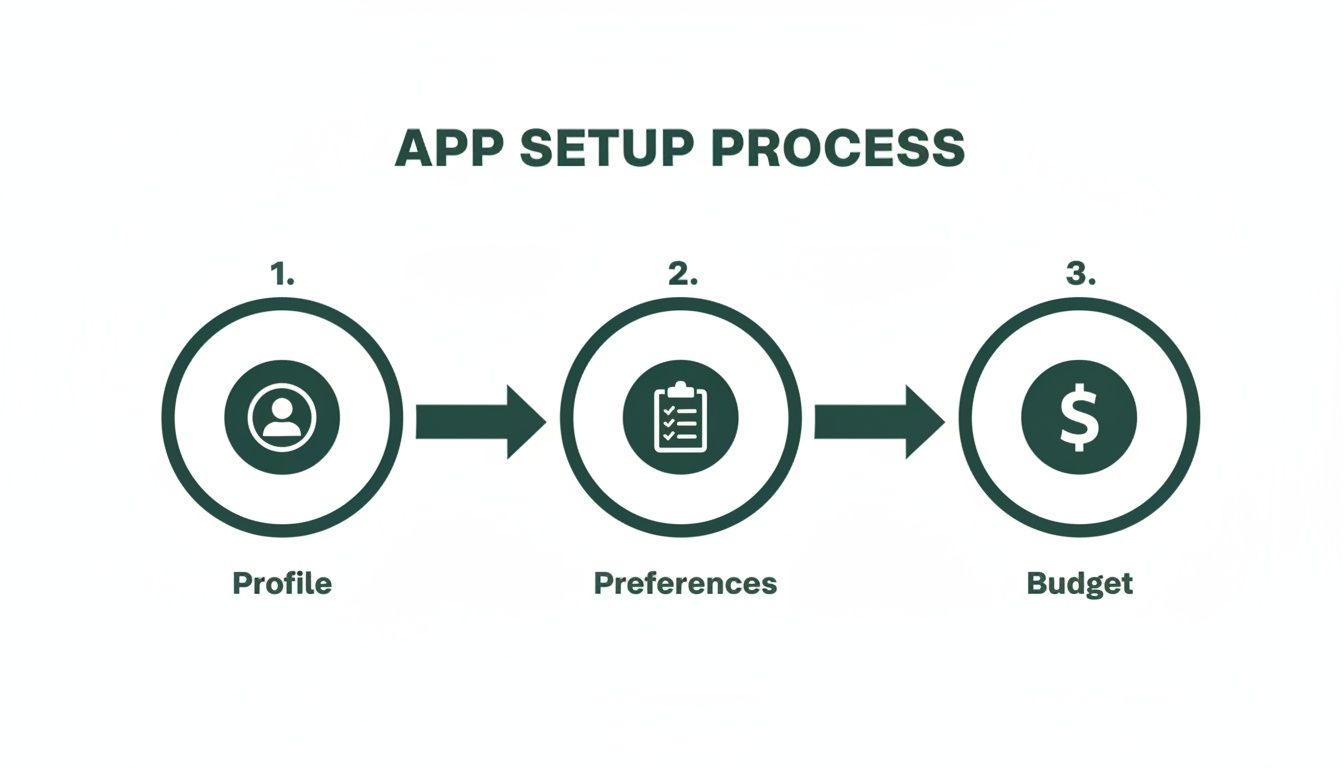
Think of these settings as the secret sauce. They're what ensure every meal plan and shopping list feels like it was made just for you, because it was.
From a Perfect Plan to Groceries on Your Doorstep
Let’s walk through a real-world scenario. The app suggests Sheet Pan Nachos for Friday night. Genius! But it also slated a fish recipe for Tuesday, and you just remembered Timmy has late soccer practice. That’s not happening.
No sweat. With a quick tap, you can swap it out for a 20-minute Queso Chicken Chili recipe instead. The truly great apps will even suggest swaps that use some of the same ingredients you’re already buying, which is a fantastic way to cut down on food waste.
Once your plan is looking good, you hit the holy grail button: “Create Shopping List.” In seconds, the app scans every recipe, combines all the needed ingredients, and cross-references your digital pantry to remove stuff you already have. No more buying a third jar of paprika.
This seamless automation is exactly why the meal planning market is exploding, projected to jump from USD 485.52 million in 2024 to over USD 1,002.60 million by 2032. Features like AI-powered shopping lists are game-changers, helping online grocers reduce cart abandonment by a whopping 22%. For families like ours, it translates to saving an estimated $50-$100 every month on wasted food and those sneaky impulse buys.
With your list ready, one more tap sends the whole thing over to Instacart. And just like that, you're done. Your groceries are scheduled to arrive at your door. You just won back your Sunday afternoon.
To give you a clearer picture, here’s a little snapshot of what a few days of an AI-generated plan can look like.
A Glimpse into an Automated Meal Week
This table shows a sample 3-day meal plan. Notice how it balances easy-to-make favorites with nutritious options, taking the daily guesswork completely off your plate.
| Day | Breakfast | Lunch | Dinner |
| Monday | Greek Yogurt with Berries & Granola | Turkey & Avocado Wraps | Lemon Herb Roasted Chicken |
| Tuesday | Scrambled Eggs with Spinach & Toast | Leftover Chicken Salad | 20-Minute Queso Chicken Chili |
| Wednesday | Oatmeal with Banana & Walnuts | Quinoa Salad with Chickpeas | Sheet Pan Italian Sausages |
See? Simple, varied, and no agonizing decisions required. It’s all about creating a sustainable routine that actually works for a busy family.
Your Sous Chef for the Week
The app’s job doesn’t stop when the groceries arrive. Now, it transforms into your in-kitchen assistant, guiding you through the week.
- Meal Prep Schedules: It can actually help you plan your prep. For example, it might prompt you on Sunday to chop the onions and peppers for both Tuesday's chili and Wednesday's sheet pan dinner at the same time.
- Cooking Mode: When it’s time to cook, you just pull up the recipe. Most apps have a "cook mode" that keeps your screen on and shows instructions in big, bold text you can check off as you go.
- Quick Adjustments: Having friends over? The app can automatically double the ingredient quantities for a recipe. No frantic math needed.
This entire system—from a personalized plan, to a delivered grocery order, to daily cooking help—is what makes a modern meal plan and shopping list app so indispensable. It's a complete workflow designed to give you back time and bring a sense of order to the daily dinner chaos.
This process is all about cutting out the mental load. If you want to get even more out of this, check out our guide on creating a truly automated grocery list. It’s packed with tips to make your life even easier.
Become a Meal Planning Power User
Alright, you’ve got the hang of the basics. Your app is adding things to your Instacart list, you're not staring into the fridge wondering what’s for dinner every single night... so what's next? It's time to unlock the really cool stuff.
This is where you go from being someone who just uses the app to someone who makes it work for them. Think of it as graduating from kitchen apprentice to certified meal-planning ninja. These are the insider tricks that will save you even more time, money, and sanity.
Let's start by giving your week a rhythm. One of the best things I ever did was to implement "theme nights." Seriously. No more blank slate on a Monday morning. Now, I just know it’s Pasta Night, and the app already has a framework to work within. Its suggestions suddenly become way more helpful.
Go Beyond Basic Meal Planning
Ready to level up? Let’s get into some next-level strategies that turn your app into a true kitchen command center. They're simple tweaks, but they have a huge impact on how your week flows.
- Program Your Theme Nights: Don't just think about Taco Tuesday; make it official! Go into your app's settings and create recurring meal types. Set up your week with themes like "Meatless Monday," "Taco Tuesday," "Pasta Wednesday," or "Sheet Pan Friday." The app will then start suggesting recipes that perfectly fit each day's vibe. You get all the variety with none of the mental gymnastics.
- Batch-Cook Your Building Blocks: This is a total pro move. Instead of just prepping entire meals on Sunday, cook a big batch of a versatile ingredient, like a few pounds of shredded chicken or a big tray of roasted veggies. Then, you can use your app to plug that ingredient into different meals all week. Think chicken tacos on Tuesday, chicken salad wraps for lunch Wednesday, and maybe BBQ chicken flatbreads on Friday. It's the secret to cooking once and eating three completely different ways.
The real magic of a smart meal planning app is how it adapts to your strategies. You’re not just a user clicking buttons; you’re the director, using the app's features to run a smarter, more efficient kitchen for your family.
Master Your Kitchen and Your Budget
Your app can also be a secret weapon for special occasions and for seriously slashing your grocery budget.
Planning a holiday dinner or a kid’s birthday party? Don't jumble it all up with your regular groceries. Create a separate, one-time meal plan just for that event. The app will generate a dedicated shopping list, keeping those occasional expenses neatly organized and out of your weekly budget.
Another one of my favorite tricks is the "pantry challenge." Before you even think about planning your week, pop open your app’s pantry feature and log everything you already have. Then, challenge the app to build meals using those on-hand ingredients first. It’s one of the most satisfying ways to shrink your grocery bill and finally use that can of chickpeas from three months ago.
To truly master your kitchen, combine these app tricks with other great meal planning tips. The right techniques paired with the right digital tool make all the difference.
If you're ready to explore even more powerful features, our guide to the best meal planner software is the perfect place to see what else is out there.
Answering Your Burning Questions About Meal Planning Apps
I get it. Diving into a new app, especially when it's supposed to wrangle the daily chaos of feeding your family, can feel a little daunting. When you’re used to a system of sticky notes, half-forgotten recipes, and panicked "what's for dinner?!" texts, switching to a digital sidekick seems like a big step.
Let’s walk through some of the biggest questions I hear from parents on the fence about using a meal plan and shopping list app. You’ve got enough on your plate—literally and figuratively—without adding tech troubles to the list. These tools are meant to make life easier, not more complicated.
Will This Thing Actually Save Me Money?
You bet it will. The savings sneak up on you in two brilliant ways. First, you put an end to those impulse buys that mysteriously leap into your cart at the grocery store. When you walk in armed with a precise, mission-driven list, that shiny new brand of cookies has a lot less power over you.
Second, you stop throwing away food. We’ve all been there—that sad, wilted bunch of cilantro you bought with the best intentions. The app helps you plan meals around what you already have, so food waste plummets. Honestly, most families I know who made the switch save anywhere from $50 to $100 a month. That adds up!
What About My Super Picky Eaters?
Ah, the ultimate challenge. This is where a smart app really earns its keep. It's basically built to solve the picky-eater puzzle. During the initial setup, you can plug in every single one of your family’s quirks, from "no green things touching" to "only crispy chicken nuggets."
Think of it as a personal chef who's a really, really good listener. The app’s brain learns every time you rate a meal, so its suggestions get smarter over time. It quickly figures out your family’s unique tastes and stops recommending recipes that will get an immediate "eww."
Seriously, How Much Time Does This Take Each Week?
Let's be real, your time is gold. Getting everything set up for the first time will probably take about 20 minutes. Think of it as a one-time investment that pays off every single week afterward.
Once you’re set up, your weekly planning session can shrink down to just 5-10 minutes. Your new routine is ridiculously simple:
- Pop open the app and glance at the weekly plan it created for you.
- Make a few quick swaps if a recipe doesn’t sound good that day.
- Hit one button to send the perfectly organized list straight to your grocery delivery service.
And... you're done. That little bit of screen time replaces hours of scrolling through recipe blogs, scribbling down messy lists, and aimlessly wandering through crowded grocery aisles. It’s about getting your weekend—and your sanity—back.
---
Ready to finally kick the dinner chaos to the curb and put your grocery runs on autopilot? Meal Flow AI uses smart tech to whip up personalized meal plans your family will actually eat and sends the shopping list right to Instacart. Give it a try and see how ridiculously easy mealtime can be at https://mealflow.ai.