Mastering Top Grocery Delivery for Effortless Meal Prep
Discover the secrets to top grocery delivery. This guide helps busy families automate meal prep, sync Instacart with AI, and reclaim hours every week.
Love This Article?
Get personalized meal plans with recipes like this, automatically matched to your nutrition targets.
Let's be real—the weekly grocery run can feel like a marathon you never signed up for, especially with kids in tow. The top grocery delivery services like Instacart have become an absolute lifesaver, turning this dreaded chore into something I can knock out from my phone while waiting in the school pickup line. This isn't just about saving an hour; it's about reclaiming my entire weekend and what's left of my sanity.
Your New Superpower: Automated Grocery Delivery

For those of us juggling meal prep, school runs, and a million other things, mastering grocery delivery is less of a nice-to-have and more of a strategic weapon. It's the secret to getting precious hours back, turning a major source of stress into a simple, checked-off task.
Just think about all the little things that eat up your time: scribbling down a list (and forgetting it on the counter), navigating crowded aisles, waiting in checkout lines, and then hauling everything inside. It adds up, stealing a huge chunk of your week that you could be spending on things that actually fill your cup.
More Than Just a Convenience
The real power move here is linking smart tools with your delivery service. When you pair an intelligent meal planner like Meal Flow AI with Instacart, you’re not just ordering groceries anymore. You're putting the entire cycle—from meal planning to a fully stocked fridge—on autopilot.
This combo completely changes the game. Suddenly you can:
- Ditch Manual List-Making: Your meal plan spits out a perfectly organized shopping list with zero effort from you.
- Lighten Your Mental Load: The constant "what's for dinner?" panic is gone. It's all planned out, freeing up so much brain space.
- Actually Stick to Your Budget: Ordering only what your recipes call for helps you dodge all those tempting impulse buys that sneak into your cart at the store.
This shift is more than just a trend; it's a fundamental change in how modern families are managing their households. The online grocery market is exploding, with projections showing it will surge by USD 1183.5 billion between 2024 and 2029. Giants like Walmart hit USD 58.9 billion in online grocery sales in 2024, while Instacart’s sales jumped a wild 230% year-over-year from 2019 to 2020 alone.
What does that mean for you? Better, faster, and more reliable service. You can dive into the full market analysis to see the nitty-gritty, but the bottom line is that this industry is growing to serve us better.
By turning your meal plan into an automated shopping list, you're not just saving time—you're creating a system that works for you, week after week. It’s about building a sustainable routine that supports your family’s health and your own well-being.
Your Weekly Time Savings With Automated Grocery Delivery
Wondering how much time you'll actually get back? It's more than you think. Here’s a quick look at how much time you can reclaim each week by switching from traditional shopping to an automated grocery delivery system for your meal prep.
| Shopping Task | Traditional Method (Weekly Time) | Automated Delivery (Weekly Time) | Time Saved Per Week |
| Meal Planning & List Making | 60-90 minutes | 15 minutes | 45-75 minutes |
| Travel to/from the Store | 30-45 minutes | 0 minutes | 30-45 minutes |
| In-Store Shopping & Checkout | 60-90 minutes | 0 minutes | 60-90 minutes |
| Unpacking & Organizing | 15 minutes | 10 minutes | 5 minutes |
| Total Weekly Time | 2.75 - 4 hours | 25 minutes | ~2.5 - 3.5 hours |
Seeing the numbers laid out like that is pretty eye-opening, right? That's an entire afternoon back in your pocket every single week.
In this guide, we'll walk through the practical, actionable steps to make the best grocery delivery services work for your family's real-life needs. Forget generic advice; we're giving you the blueprint to master your meal prep workflow and finally win back your week.
Picking Your Grocery Delivery Champion
Okay, let's get real about grocery delivery services. Choosing one can feel like trying to pick the "best" brand of diapers—everyone has a strong opinion, and what works for your neighbor might be a total disaster for you. When you’re depending on this to keep your meal prep train on the tracks, the little details become a very big deal.
We're going to cut through the marketing fluff and get down to what actually matters for a busy mom trying to get dinner on the table.
It's More Than Just a Logo: What to Actually Compare
When you're sizing up services like Instacart, Shipt, and Amazon Fresh, you have to put on your meal-prep strategist hat. The right service is a true partner in crime; the wrong one just adds another layer of chaos to your week.
Here’s my personal checklist:
- Store Selection: Are we talking just the big-box giants, or can you get items from your go-to local spots? Instacart usually has the edge here, with a wild variety of partners from Aldi to Wegmans. Shipt is Target’s best friend but has branched out, and Amazon Fresh leans heavily on its own inventory and Whole Foods.
- Shopper Savvy: Is your shopper a produce whisperer who instinctively knows a good avocado from a sad, hard rock? Or are they just grabbing the first thing they see? Instacart and Shipt have shopper rating systems, and I live by them. A great shopper is worth their weight in gold-standard produce.
- The Substitution Game: What’s the plan when the organic chicken broth your recipe absolutely needs is out of stock? Top-tier services let you approve swaps in real-time or set your preferences ahead of time. This is the difference between a minor hiccup and a full-blown meal plan meltdown.
When it comes down to it, the process is similar to choosing the right delivery service for anything important—you’re looking for reliability and a service that genuinely makes your life easier.
Real-Life Stress Tests
Theory is great, but let's talk about real-world scenarios. It's 4 PM on a Tuesday. You just discovered the gluten-free bread your kiddo needs for tomorrow's lunch is gone. Gone. This is when delivery speed isn't a luxury; it's a lifeline.
Amazon Fresh and Instacart are often in a dead heat for the fastest delivery, sometimes getting groceries to your door in under two hours. For a super detailed comparison, our guide on Instacart vs. Amazon Fresh breaks down the nitty-gritty on speed and service.
And let's not forget the produce gamble. We've all been there: you order avocados for Taco Tuesday and get green rocks that won't be ripe until Saturday. This is where shopper communication is everything. The best shoppers will text you a picture from the aisle: "These avocados are a bit firm, want me to grab them or look for something else?" That, right there, is priceless.
The best grocery delivery service isn't the one with the trendiest commercials. It's the one that consistently gets you quality ingredients, respects your "no weird substitutions" rule, and saves you from those last-minute, panic-inducing store runs.
Making the Final Decision for Your Crew
The grocery delivery world is booming, which is fantastic news for us. The competition is fierce. Nearly 60% of all online grocery spending is now on delivery. Giants like Amazon are pushing same-day service into over 1,000 cities, and with cooking essentials making up a whopping 34% of the market, these platforms are practically built for meal preppers.
So, how do you pick? It really boils down to your family's unique needs:
- Your Budget: Do the math on a membership (like Instacart+ or Shipt Everyday) versus paying for each delivery. If you’re ordering once a week or more, a membership is almost always a money-saver.
- Your Favorite Stores: Which service partners with the stores you already know and love? Check if you can link your loyalty cards, too—those points and discounts add up!
- Your Timing: Are you a meticulous planner who schedules orders days in advance, or do you thrive on last-minute, "I need it now!" chaos?
My best advice? Take them for a spin. Almost all of these services offer a free trial. Place your typical weekly order on two different platforms and see who comes out on top. It’s the only way to know for sure which one will become your new best friend.
Let's Put Your Shopping on Autopilot with Meal Flow AI and Instacart
Okay, this is where the real magic happens. We’ve scouted the best delivery services, but now it’s time to make your entire grocery routine run itself. Seriously. Forget scribbling lists on the back of an envelope or that mid-meltdown panic when you can't remember if you're out of paprika.
By plugging an intelligent meal planner like Meal Flow AI directly into a top grocery delivery service like Instacart, you create a powerful, seamless system. This isn't just about saving a bit of time—it's about completely erasing a huge chunk of mental labor from your weekly to-do list.
From "What's for Dinner?" to a Full Cart in Clicks
Everything starts in your Meal Flow AI account, which is about to become your new food command center. The first thing you'll do is tell the system a little about your family.
This is where you set the ground rules:
- Dietary Needs: Got a gluten-free kiddo or a dairy sensitivity? Set these preferences once, and every single recipe suggestion will follow your rules.
- Allergies: This is a big one. You can input any allergies—from peanuts to shellfish—to ensure your meal plan is always 100% safe for your family.
- Picky Eater Patrol: You can even flag specific foods as a hard "no" for your little ones. The AI actually learns what they like and won't suggest meals that are destined to end in a dinnertime standoff.
Once your profile is set up, Meal Flow AI whips up a weekly meal plan just for you. You can easily swap recipes, move days around, and get it just right. The best part? Each recipe automatically calculates the exact ingredients and quantities you'll need.
This is it. This is the end of the 5 p.m. dinner panic. Your plan is set, the thinking is done, and you’re ready to turn it all into a pantry full of food.
When you're syncing your meal plan, you're essentially choosing a service that best fits that week's needs—balancing speed, variety, and quality.
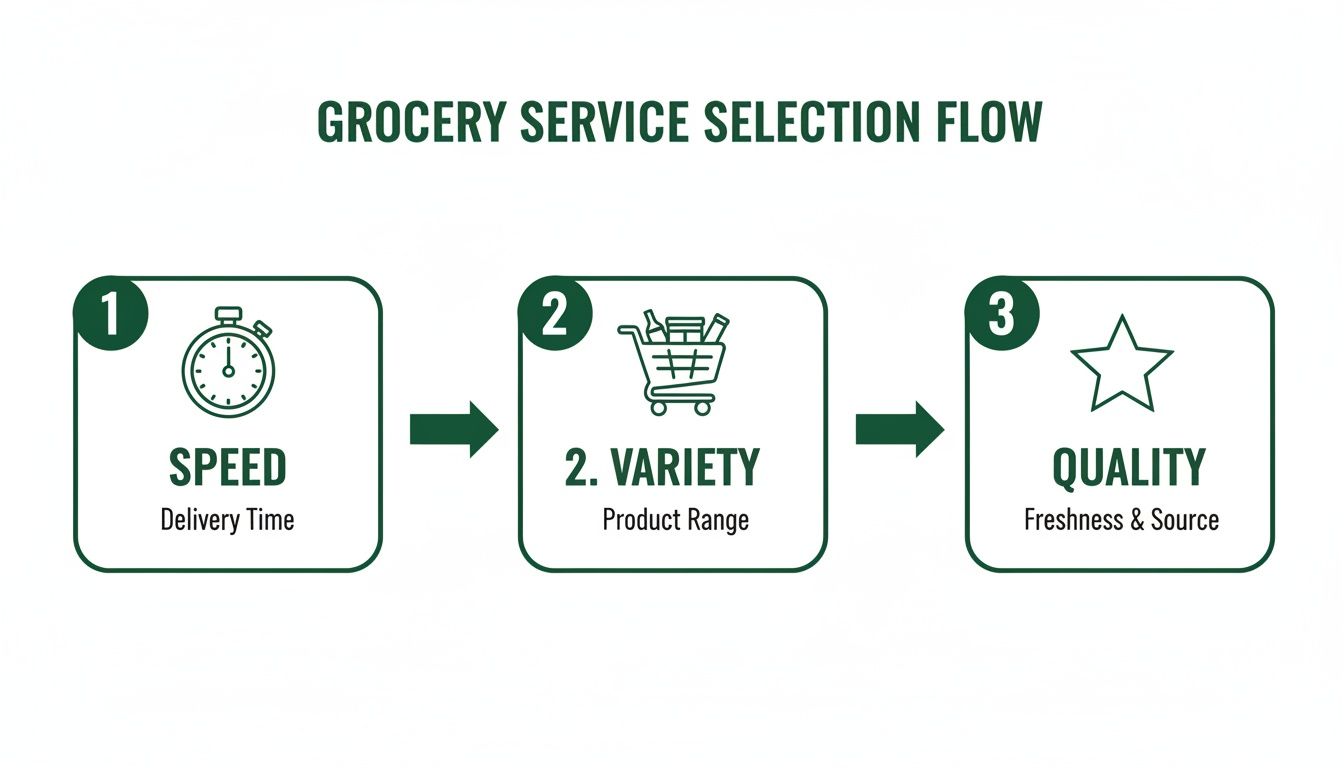
This kind of streamlined system lets you decide what matters most. Do you need ingredients ASAP for tonight, or are you stocking up for a week of gourmet meals?
The Glorious Instacart Sync
With your meal plan locked and loaded, you'll see a big, beautiful button that says something like "Send to Instacart." One click, and the system works its digital wizardry. Suddenly, every ingredient from your entire week of meals appears as a brand-new shopping list inside your Instacart account.
And it’s not just a chaotic brain dump of items. The list is intelligently organized by aisle, just like you’d write it yourself (if you had the time and a personal assistant!). Produce is all together, dairy has its own section, and all your pantry stuff is neatly lined up. It makes giving it a final once-over a total breeze.
Fine-Tuning Your Automated List
An automated list is a game-changing starting point, but it's not set in stone. The real power is in how quickly you can tweak it to fit your actual life. This is where you add that pro-mom touch before you hit "Order."
Here are a few adjustments I always make:
- Add the Essentials: The list has all your recipe ingredients, but what about paper towels, diapers, or that specific coffee creamer that makes mornings survivable? It takes two seconds to add these non-food items to the same order.
- Adjust for Batch-Cooking: Making a double batch of chili to freeze for a crazy night next week? Just bump up the quantities for the ground beef, beans, and tomatoes right in the Instacart list. Easy.
- "Shop Your Pantry" First: Give your list a quick scan and uncheck anything you already have. There's no sense in buying another jar of cumin when you've got three hiding in the spice cabinet!
This final review takes me maybe five minutes, but it guarantees my order is perfect. For even more pro tips, check out our detailed guide on building the perfect Instacart grocery list.
Once your list is customized, all you have to do is pick a delivery window, place your order, and listen for the doorbell. You’ve just gone from a blank slate to a fully stocked fridge with a few clicks. Now that's how a top grocery delivery service becomes a superpower for a busy parent.
Pro Hacks for Smarter Deliveries and Savings
Getting your groceries dropped at your doorstep is amazing, but turning that convenience into a money-saving, time-bending superpower? That's the real win. It’s about more than just mashing the "order" button.
With a few insider tricks, you can master your top grocery delivery service and make it work way harder for your schedule and your wallet. Think of it as a game—the goal is to get the best stuff, at the best price, right when you need it, minus the drama. Let's get into the strategies that separate the amateurs from the pros.
Sidestep the Surge and Snag the Best Slots
Just like with Uber or Lyft, grocery delivery apps have rush hour. Order when everyone else is, and you’ll get hit with surge pricing and slim pickings for delivery windows. Trying to schedule a delivery on a Sunday afternoon or right after 5 PM on a weekday is just asking to pay more.
The secret? Zig when everyone else zags.
- Mid-Week Mornings are Golden: Tuesday, Wednesday, and Thursday mornings are usually the sweet spot. Demand is way down, which means no surge fees and your pick of delivery times. Bonus: you're more likely to get a shopper who's fresh, focused, and not rushing.
- Book It in Advance: Don't wait until you're staring into an empty fridge. Most apps let you schedule deliveries days ahead. Lock in that Wednesday morning slot on Monday night before it’s gone.
Simply shifting when you order can easily save you a few bucks on fees and guarantee the delivery fits into your day, not the other way around.
The Great Membership Debate
So, is a subscription like Instacart+ or Shipt Everyday actually worth the cash?
The short answer: it totally depends on how often you're ordering. If you're getting groceries delivered once a week or more, a membership almost always pays for itself.
Let's do some quick "back of the napkin" math for a family getting weekly deliveries:
| Cost Component | Pay-Per-Delivery (Weekly) | Instacart+ Membership (Weekly Avg.) |
| Delivery Fee | ~$5.99 | $0 (on orders over $35) |
| Service Fee | Reduced | Lowered Rates |
| Weekly Cost | ~$8-10 | ~$2 (based on $99 annual fee) |
| Monthly Savings | N/A | ~$24-32 |
This simple breakdown shows that a membership can easily save you over $300 a year. And that doesn't even count the other perks, like credits back on pickup orders and exclusive deals.
The online grocery world is a battlefield, and these services are constantly throwing out promotions to get you on their team. With US e-grocery sales hitting a wild USD 12.7 billion in a single month in 2025 and big players like Walmart seeing 21% annual sales growth, they're fighting hard for your loyalty. For you, this means memberships offer real value. You can dive deeper into the dynamics of online grocery shopping to see just how competitive it's gotten.
Master the Art of Substitutions
Nothing sabotages a meal plan faster than a rogue substitution. You needed plain Greek yogurt for a marinade, and you got vanilla instead. Dinner is officially derailed. For a serious meal prepper, taking control of your substitution preferences is absolutely non-negotiable.
When you're building your cart, you have three choices for every single item:
- Find Best Match: This is you telling the shopper, "Use your best judgment." It’s fine for things like a different brand of canned tomatoes.
- Pick Specific Replacement: You choose the exact backup item yourself. This is perfect when you have a second-choice brand you know and trust for things like pasta or cereal.
- Don’t Replace: This is your secret weapon. For those critical, can't-mess-this-up ingredients—that specific gluten-free flour, the one brand of coconut milk that doesn't separate, or a particular cut of meat—always hit this button. It ensures you either get the exact item or a refund. No surprises, no ruined recipes.
Seriously, taking two minutes to set your substitution preferences before you order is the single best thing you can do to protect your meal plan and avoid a major headache.
In the end, a clear and well-crafted Instacart shopping list is your first line of defense. A little effort upfront saves you a world of hassle later.
How to Troubleshoot Common Delivery Hiccups
Let's be real—even the most perfectly planned grocery delivery can hit a snag. We've all been there. You excitedly open your bags, ready to tackle your meal prep, only to find you've been blessed with someone else's kale chips, your ice cream has sadly returned to its liquid state, or the one avocado you desperately needed is a mushy, bruised mess.
Deep breath. A delivery disaster doesn't have to torpedo your entire week's meal plan. The secret is knowing how to handle these little bumps in the road without losing your cool. Here’s your game plan for turning a grocery fail into a quick, easy fix.
Your Go-To Script for Contacting Support
The second you spot a problem, jump on it. Most apps like Instacart make it ridiculously easy to report an issue right from your phone—no need to get stuck on hold or draft a strongly-worded email. A few quick taps are usually all it takes.
Here’s the drill:
- Pop open the app and head to your order history.
- Tap on the order that's giving you trouble.
- Look for a button that says something like "Report an Issue" or "Help."
- You'll see a list of everything you ordered. Just tap the item that's wrong.
The app will then give you a checklist of what could have gone wrong. Pick the one that fits your situation, whether it's "Wrong Item," "Damaged Item," or my personal favorite, "Missing Item."
If it's something you can see, like a sad-looking avocado, snap a quick picture. A photo is your golden ticket to getting things resolved lightning-fast. In most cases, they'll issue an instant credit or refund to your account. Easy peasy.
Handling Specific Delivery Mishaps
Okay, so not all problems are the same. A missing bag of pretzels is an inconvenience. A missing rotisserie chicken for tonight's dinner? That's a code-red situation.
For Missing or Wrong Items: If a crucial ingredient for your meal plan didn't make it, that instant credit is your superpower. I immediately use it to place a small, new order from a store that offers super-fast 30-minute delivery. It’s like sending out a tiny rescue mission for dinner.
For Damaged Goods: Melted ice cream, a squished loaf of bread, or a leaky milk carton are all no-brainers. Report it, get your credit, and just add it to your shopping list for next week. Sometimes your top grocery delivery hits a delay that causes these issues. It can be helpful to understand what a shipment exception means in the logistics world—it basically explains why these things occasionally happen.
The trick is to be specific, polite, and fast. These support systems are built to fix things quickly, especially when you give them clear info and a photo.
Giving Feedback That Actually Helps
Once you've sorted out the refund, there's one last crucial step: rate your shopper and leave some feedback. This is so important for making the service better for you and everyone else.
But instead of just leaving a low star rating, be constructive.
- Good Feedback: "The bananas were a little too ripe this time. I'd love it if they were a bit greener next week, please!"
- Bad Feedback: "Wrong bananas."
See the difference? One gives the shopper a chance to get it right next time, while the other just sounds grumpy.
Remember, these shoppers are people just trying to do a good job. When you build a good rapport with clear, kind feedback, you often get matched with your favorite 5-star shoppers again. It's like training your own personal grocery assistant to know exactly how you like things.
Got Questions About Grocery Delivery? I've Got Answers.
Jumping into an automated grocery system can feel like a big step. Trust me, I know. It's totally normal to have a few questions buzzing around your head before you take the plunge. As a mom who has lived and breathed this system for years, I get asked the same things all the time by friends who are curious but hesitant.
So, let's just get right to it. I want to tackle those big "what ifs" and "how do I's" that are probably on your mind, too. This is the real, honest chat about how this whole thing actually works in the messy, beautiful reality of family life.
"Okay, But Is This System Actually Cheaper Than Me Shopping?"
This is the million-dollar question, isn't it? When you look at the whole picture—I’m talking gas for the car, all those tempting impulse buys, and most importantly, the value of your own time—many families discover an automated system is either cheaper or breaks even. The real saving isn't just in dollars; it's in your time and sanity.
Let's be real: impulse buys are a budget-wrecker. How many times have you run in for milk and bread and walked out $50 heavier with stuff that wasn't on the list? With a shopping list generated by your meal plan and sent straight to Instacart, you’re only ordering what you actually need. It's like having built-in financial discipline.
The question isn't just "Does it save money?" but "Where does it save me?" It saves you from blowing your budget on snacks you don't need and gives you back hours you'd otherwise lose wandering the aisles. That's a huge return on investment.
Yes, you have to account for delivery fees and tips. But when you weigh that against a super-focused, planned grocery order with zero temptations, you might be shocked at how your bank account looks at the end of the month.
"How Do I Make Sure I Get Good Produce and Meat?"
Oh, I get this one. Letting someone else pick your avocados feels like a massive trust fall. This was my biggest hesitation, too! But here’s the secret: you have way more control than you think. Getting consistently great fresh food from your top grocery delivery service comes down to a few smart moves.
First off, your shopper's rating is everything. I always look for shoppers with high ratings and, more importantly, positive comments that specifically mention produce selection. These are the pros who know the difference between an avocado that’s ready for tonight and one that needs a couple more days on the counter.
Second, the "notes" feature is your new best friend. Seriously, get specific!
- For avocados: "Please pick avocados that are firm but give slightly—perfect for guacamole in 2 days."
- For bananas: "We like them a little green, please!"
- For steak: "Looking for well-marbled cuts, and please check the expiration dates."
This isn't being picky; it's just being clear. Good shoppers actually appreciate the guidance because it helps them nail your order, which means a better rating for them. It’s a win-win. And when you get a fantastic shopper, give them five stars! The app often prioritizes matching you with your favorites in the future.
"What's the Best Way to Handle Substitutions for a Recipe?"
Nothing is worse than a bad substitution that completely derails a dinner you were excited to make. The key to avoiding this nightmare is to be proactive with your substitution settings inside the Instacart app—before you even place the order.
For every single item on your list, you have a few powerful choices:
- Find Best Match: This tells the shopper to use their best judgment. It’s a safe bet for flexible items, like swapping one brand of organic canned tomatoes for another. No biggie.
- Pick Specific Replacement: Here, you get to choose the exact backup item yourself. This is perfect when you have a solid second-choice brand for things like pasta, cereal, or yogurt.
- Don't Replace: This is your non-negotiable, must-have setting. Use this for critical recipe ingredients where a swap would be a disaster. Think of that special gluten-free flour for your kid's birthday cake or the specific coconut milk you need for a curry. If they don't have it, you just get a refund. No surprises, no ruined dinners.
Taking an extra two minutes to set these preferences is the single best thing you can do to protect your meal plan. It makes sure your top grocery delivery order shows up ready for the week you’ve planned, keeping everything running smoothly.
---
Ready to stop the guesswork and put your meal planning and grocery shopping on autopilot? Meal Flow AI generates personalized meal plans and sends them directly to Instacart, saving you hours every single week. Start your free trial today and see the magic for yourself!